1. Fetch API란?
- HTTP 통신의 요청(request)과 응답(response)등의 리소스를 JavaScript에서 접근하고 조작할 수 있는 인터페이스이다.
- Promise를 활용한 JavaScript 자체의 비동기 처리 인터페이스이다.
- Fetch Interface
- GlobalFetch : 리소스를 취득하기 위해 사용되는 fetch() 메서드가 정의되어 있다.
- Headers : Request와 Response 객체에 대한 헤더이다. 헤더정보에 보내는 쿼리나 통신 결과에 대한 행동을 제어할 수 있다.
- Request : 리소스에 대한 요청 객체다.
- Response : Request에 대한 응답 객체다.
2. fetch()
- fetch()가 반환하는 프로미스 객체는 404, 500과 같은 HTTP 오류 상태코드를 수신해도 거부(rejected)되지 않는다.
- 응답의 상태가 200-299를 벗어날 경우 Response.ok 속성이 false로 설정된다.
- 프로미스가 거부되는 경우는 네트워크 연결이 실패하는 경우를 포함, 아예 요청을 완료하지 못한 경우 뿐이다.
3. Fetch API 예제
fetch.html
<!DOCTYPE html>
<html lang="en">

<head>
    <meta charset="UTF-8">
    <meta http-equiv="X-UA-Compatible" content="IE=edge">
    <meta name="viewport" content="width=device-width, initial-scale=1.0">
    <title>Document</title>
    <script defer src="./fetch.js"></script>
</head>

<body>
    <input type="button" onclick="getData()" value="불러오기" />
    <table border="1">
        <thead>
            <tr>
                <th><span id="지역">지역</span></th>
                <th><span id="학원">학원</span></th>
                <th><span id="개강일">개강일</span></th>
                <th><span id="이름">이름</span></th>
                <th><span id="연락처">연락처</span></th>
            </tr>
        </thead>
        <tbody></tbody>
    </table>
</body>

</html>
fetch.js
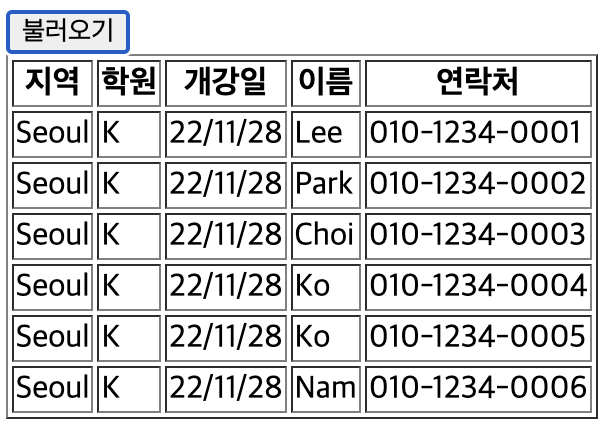
function getData() {
    fetch('./fetch.json')
        .then((res) => {
            const jsonData = res.json();
            return jsonData;
        }).then((jsonData) => {
            let ins = "";
            for (let i in jsonData.Member) {
                ins += `<tr>`;
                ins += `<td>`;
                ins += `${jsonData.Address}`
                ins += `</td>`
                ins += `<td>`;
                ins += `${jsonData.Company}`
                ins += `</td>`
                ins += `<td>`;
                ins += `${jsonData.Begin}`
                ins += `</td>`
                ins += `<td>`;
                ins += `${jsonData.Member[i].name}`
                ins += `</td>`
                ins += `<td>`;
                ins += `${jsonData.Member[i].phone}`
                ins += `</td>`
                ins += `</tr>`;
            }
            const body = document.querySelector('tbody')
            body.innerHTML = ins;
        })
        .catch(alert);

}
fetch.json
{ "Company" : "K",
  "Address" : "Seoul",
    "Begin" : "22/11/28",
   "Member" : [{ "name" : "Lee",
                "phone" : "010-1234-0001"},
               { "name" : "Park",
                "phone" : "010-1234-0002" },
               { "name" : "Choi",
                "phone" : "010-1234-0003" },
               { "name" : "Ko",
                "phone" : "010-1234-0004" },
               { "name" : "Ko",
                "phone" : "010-1234-0005" },
               { "name" : "Nam",
                "phone" : "010-1234-0006" }] }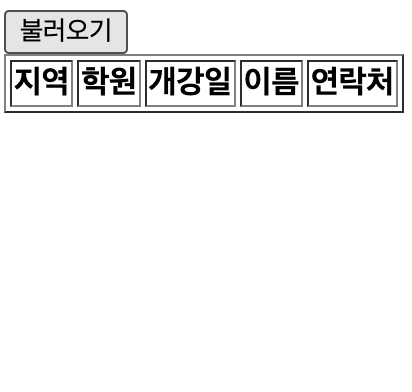
반응형
'JAVASCRIPT > ES6' 카테고리의 다른 글
| [JS] Closure (0) | 2023.02.06 |
|---|---|
| [JS] module과 import / export (0) | 2023.02.05 |
| [JS] 비동기 처리 (1) - Promise (1) | 2023.02.04 |
| [JS] Currying (0) | 2023.02.03 |
| [JS] Spread Syntax (전개 구문, 전개 연산자) (0) | 2023.02.02 |


댓글